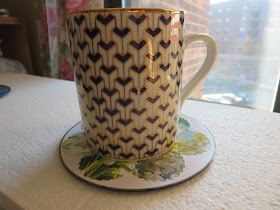
Gift ideas - recycled DVDs and CDs

 We are all more conscious of the tremendous amount of waste produced on a daily basis.

We have been saving many of our DVDs that we no longer need and started being creative with them.

Here are few of them online. We use recycled magazines, junk mail, notecards and greeting cards in a creative way. You forget that they were headed to the trash can.

I hope you will like some of them. It's a better alternative, in my opinion to the small square coasters. It's much roomier to hold your favorite cup of coffee or tea, as well as drinks. They also make great house warming gifts as well. 


 (click on the images to purchase, if they are still available. Don't worry, new designs are coming up often)

Check the coasters section often, as new items get added. If you buy more than $35 worth of giftable items, you would get 10% discount, till May 21st, 2021. 

 What other themes and colors would you like to see?

Comments

Popular posts from this blog

All about using CANVA

  To use Canva to create digital art from analog photos,  upload your photo, then use built-in apps like Sketchify to turn it into a sketch or AI art generator to create art in various styles .  You can then refine the image with  filters ,  crop it, add text, and download the final result.   Here are the steps to convert your analog photo into digital art: 1. Upload your Photo Launch  Canva  on your desktop or mobile device.   Start a new project or open an existing one.   Upload your analog photo to your design using the "Uploads" tab or drag and drop it onto the canvas.   2. Apply a Digital Art Style Photo to Sketch: In the editor, go to the "Apps" icon on the left sidebar.   Search for and select the  Sketchify  or  Sketch to Life  app to convert your photo into a sketch or drawing.   AI Art Generation: Go to "Apps" and search for  Magic Media  or another AI art generator to transform your...

How to Crochet the Easiest Hat Ever / Beginner Crochet / Crochet Pattern

This is in Russian, however you don't need to know Russian. I put it on mute and follow how he does it. Its pretty each to follow the instructions. It's at this Youtube link https://www.youtube.com/watch?v=Hid09nUY3Ss